Simulation Software for Training in the Graphic Arts
by Raimo Launonen
New educational technologies are important to the graphic arts industry for many reasons. Vocational schools have difficulty in getting new students and companies have problems with recruiting new employees to their printing and finishing departments. The reasons for this are the low status of the work, the night jobs in newspaper presses and the lack of skilled craftsmen. Because of the increasing demands for performance and economy in the industry and to raise the status of the job, new and effective learning methods are needed in printing. Multi-skilled craftsmen will be needed in the printing industry in the future, too, because of the wide variety of products and production machine types.
The PrintSim, an open and flexible simulation and multimedia system for learning printing processes, special situations, sequences and modern automation systems was developed in a joint project under the European Union's COMETT II Programme 1992-1995. A new research and development project - PostPressSIM - Computer-aided training system for book binding, finishing and mailing has been launched utilising multimedia and three dimensional virtual reality factory simulation. The time schedule of this Leonardo da Vinci programme project is 1995-1998. The PrintSim and PostPressSIM consists of several software modules and provides a notable more cost-efficient way to give training and education than by using full-scale production lines.
VTT Information Technology of the Technical Research Centre of Finland has employed simulations in research and development since the early 1970s.
The idea of a training simulator for printers came up while VTT was working with Honeywell Oy Finland (known as Altim Control at the time). The first complete PrintSim simulator with a built-in remote control system (Printa) was produced in 1987, and an expert system was used to provide the dynamics of the offset process.
In new PrintSim and PostPressSIM the research results of the partners in different parts of Europe, their knowledge of processes and know-how on teaching and course materials have been integrated into a complete, modern system for the teaching of printing technology. The partners are in Sweden, Portugal, Germany, Norway, Denmark, the Netherlands and Finland.
Computer-aided instruction systems are often designed with a view to technical considerations and overlooking the cognitive aspects. They mostly support lower-level information processing and the external control and regulation of the users' activity. Computer systems should not replace the users' thinking but provide support at the critical stages of the problem-solving processes. The training system should activate the user and support the cognitive processes by writing and visualization.
The PrintSim/PostPressSIM Course Generator (CG) supports active work by the trainee in different ways. With the text editors of the CG, the teacher can write instructions for the trainee and following these on-line instructions the trainee is able to use the PrintSim system interactively without the teacher's supervision.
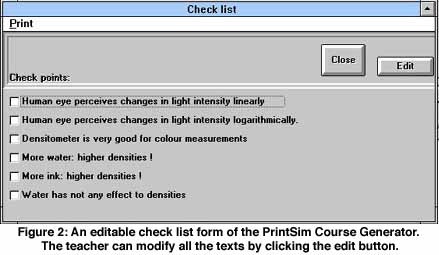
Using the CG the student can also write notes and comments and answer questions written by other students or by the teacher. The course database of the CG is open for modifications by the user and the different test forms are editable. The first type of the test forms is a check list and another type is an option list with radio buttons - all the texts in these forms are open for changes by pressing the edit button in the form (Figure 2). The trainee has to answer the questions and select the right answers to the optional choices or sequences. The teacher can also save a special starting point for the simulator and the press configuration with the course as the initial state of the simulator.
A very effective way is learning by teaching or by writing an essay on a selected topic. This kind of creative work is also possible with the Course Generator, which is also an easy-to-use authoring tool for the hypermedia. With the CG the user can create links to images and links to the pages of the multimedia modules.
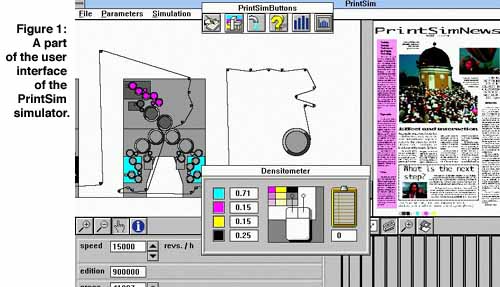
The PrintSim offset simulator works with various selectable newspaper and heatset press configurations and the Flexographic simulator works with a central impression reel-to-reel flexographic machine.
Also the operations with the training simulator before printing are realistic because, for example the page images for the simulator can be designed by any desk-top-publishing system of the user.
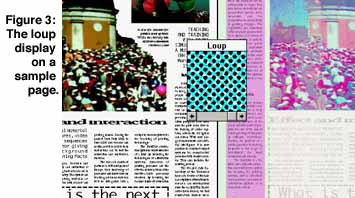
A densitometer, a magnifying glass for register error inspection and a loup for dot inspection are special simulated quality control tools for the trainee (Figure 3).
All the process parameters can be saved for analysis done by any spreadsheet software like Excel.
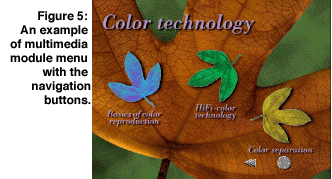
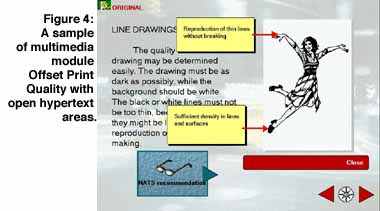
The multimedia modules can be used independently of the PrintSim and PostPressSIM systems but links are easy to create from the Course Generator. The authoring capabilities of the Course Generator increase the interactive and creative utilization of the multimedia, because the user can create own courses with the links to the selected pages of his/her to several multimedia modules.
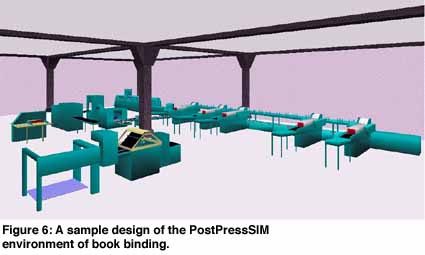
The PostPressSIM will introduce innovative multimedia and low-cost three dimensional factory simulation into the training of complicated after-printing processes. The educational multimedia modules will be 1. Newspaper mailing systems, 2. Book binding (Figure 6), 3. Packaging fundamentals and materials.
The virtual reality simulation and multimedia will make the PostPressSIM system very realistic and easy to use by different groups who need not to be closely connected with the real machines. With the flexible changes in the configuration of the simulated factory, the system can be adjusted to different demands.
The earlier version of the PrintSim simulator has been in educational use at the Espoo-Vantaa Institute of Technology and AEL since 1989. The new system with the multimedia modules has been installed and education has begun in several vocational schools and other educational institutes in more than 15 countries.
The PrintSim and PostPressSIM systems are demonstrated on the web sites in the Internet and free demo software is also available. The PrintSim web site location is http://www.vtt.fi/tte/printsim/ and the PostPressSIM is available at http://www.vtt.fi/tte/samba/projects/postpres.sim/index.htm.
Please contact:
Raimo Launonen - VTT Information Technology
Tel: +358 9 456 52361
E-mail: raimo.launonen@vtt.fi